
Solar Logic Circuits Guide: Difference between revisions
More actions
Updated "valid as of" version and date to reflect that it's been tested in this version, and still works |
Starviking (talk | contribs) |
||
| (47 intermediate revisions by 8 users not shown) | |||
| Line 1: | Line 1: | ||
[[Category:Tutorials]][[Category:Solar power]] | [[Category:Tutorials]][[Category:Solar power]] | ||
== Disclaimer == | == Disclaimer == | ||
| Line 7: | Line 7: | ||
The designs on this page are valid as of v0.2.5906.26015 (2025-09-16) | The designs on this page are valid as of v0.2.5906.26015 (2025-09-16) | ||
Guides in this section calls out the [[sensor]] and Solar Panel being placed in a specific orientation, but not all guides use the same orientation. When follow a a guide please be sure to place your sensor and solar panel as described in the guide. | |||
==Types of Tracking== | |||
There are two components to solar tracking, Horizontal position and Vertical position. A solar panel can be positioned using only one of these factors (single axis tracking) or both of these factors (dual axis tracking). Depending on the geometry of sun's sky tack on a particular planet single axis tracking can be very efficient. The solar inclination on The [[Moon]] is 0° so single axis solar tracking can be 100% efficient. | |||
== Geometry Of [[Solar Panel|Solar Panels]] and [[Sensors#Daylight Sensor|Daylight Sensors]] == | == Geometry Of [[Solar Panel|Solar Panels]] and [[Sensors#Daylight Sensor|Daylight Sensors]] == | ||
The Horizontal and Vertcal angle measured by the daylight sensor is different from the Solar panels coordinates system. In order to point the solar panel correctly either the angle read from the daylight sensor will need to be recalculated using a Math Unit, or the daylight sensor and solar panel will need to have a different orientation. The Vertical angle measured by the daylight sensor is also different from the Solar panels coordinates system. | |||
If the daylight sensor is positioned horizontally the solar panel's data port should be 90° clockwise from the daylight sensor's Data Port. This will give a Horizontal angles without needing to additional Logic and math. Obtaining a Vertical angle will require additional Logic and Math. | |||
<gallery> | <gallery> | ||
| Line 17: | Line 24: | ||
daylight sensor vertical.png|Geometry of values measured by daylight sensor in vertical (pitch) mode | daylight sensor vertical.png|Geometry of values measured by daylight sensor in vertical (pitch) mode | ||
solar panel yaw-Horizontal setting.png|Effect of setting horizontal rotation of a solar panel | solar panel yaw-Horizontal setting.png|Effect of setting horizontal rotation of a solar panel | ||
</gallery> | </gallery> | ||
==Solar tracking using Logic Chips == | ==Solar tracking using Logic Chips == | ||
=== | ===Two-chip Vertical tracking (Moon only)=== | ||
[[File:Vertical Tracking (Moon Only).png|thumb|Two-Chip Vertical tracking usable on the Moon only.]] | |||
Because the sun passes directly East to West with zero solar offset on the moon, it can be tracked using only 2 logic chips. | |||
'''What do you need:''' | |||
* [[Solar_Panel|Solar Panel (Dual)]] | |||
* [[Kit (Logic I/O)]] x2 | |||
* [[Sensors|Kit (Sensor)]] > [[Sensors#Daylight Sensor|Daylight Sensor]] | |||
* [[Cables|Cable]] | |||
* [[Power_Controller|Area Power Controller]] X1 | |||
Place the Solar panel with the data port facing sunrise. Place the Daylight Sensor vertically on the wall with the data port facing down and the sensor facing sunrise. Build a Logic reader and a Batch Writer from the 2 [[Logic I/O]] Kits. Set the Logic Reader to read the Vertical Angle from the Daylight Sensor. Set the Batch Writer to Read the Reader and output the Vertical Angle to the [[Solar Panel (Dual)]]. Manually rotate the Solar Panel to 270°. Add an Area [[Power Controller]] to make sure the Logic Chips do not lose power. | |||
==Two-chip Horizontal tracking== | |||
[[File:Horizontal Tracking.png|thumb|Two-Chip Horizontal Tracking, stand alone.]] | |||
With the daylight sensor and solar panel correctly positioned, the solar panel can tack the sun's horizontal track using only 2 chips. On [[Mars]] this can yield approximately 80% efficient solar tracking if the solar panel is manually positioned at 45° vertical. Two-chip Horizontal and two-chip Vertical tracking cannot be combined. | |||
'''What you need:''' | '''What do you need:''' | ||
* [[Solar_Panel|Solar Panel (Dual)]] | |||
* [[Kit (Logic I/O)]] x2 | |||
* [[Sensors|Kit (Sensor)]] > [[Sensors#Daylight Sensor|Daylight Sensor]] | |||
* [[Cables|Cable]] | |||
* [[Power_Controller|Area Power Controller]] X1 | |||
Place the Solar panel with the data port facing sunrise. Place the Daylight Sensor horizontally with the data port facing North and the sensor facing up. Build a Logic reader and a Batch Writer from the 2 [[Logic I/O]] Kits. Set the Logic reader to read the Horizontal Angle from the Daylight Sensor. Set the Batch Writer to Read the Reader and output the Horizontal Angle to the [[Solar Panel (Dual)]]. Manually lower the Solar Panel to 45°. Add an Area [[Power Controller]] to make sure the Logic Chips do not lose power. | |||
==Four Chip Vertical tracking== | |||
[[File:Vertical Tracking Two Axis.png|thumb|Four-Chip Vertical Tracking, stand alone.]] | |||
Vertical tracking requires two additional chips, a Logic Memory and a Math Unit. There are two different method of obtaining the correct vertical solar angle. Either (90-Solar angle) or (Solar angle+90). | |||
'''What do you need:''' | |||
* [[Solar_Panel|Solar Panel (Dual)]] | |||
* [[Kit (Logic I/O)]] x2 | |||
* [[Kit (Logic Processor)]] | |||
* [[Kit (Logic Memory)]] | |||
* [[Sensors|Kit (Sensor)]] > [[Sensors#Daylight Sensor|Daylight Sensor]] | |||
* [[Cables|Cable]] | |||
* [[Power_Controller|Area Power Controller]] X1 | |||
Place the Solar panel with the data port facing sunrise. Place the Daylight Sensor horizontally with the data port facing North and the sensor facing up. Build a Logic Reader and a Batch Writer from the 2 [[Logic I/O]] Kits. Build a Math Unit from the [[Logic Processor]] kit and place the Logic Memory. Set the Logic Reader to read the Vertical Angle from the Daylight Sensor. Set the Logic Memory to 90. Set the left input of the Math Unit to read the Logic Memory. Set the right input of the Math Unit to read the Logic Reader. Set the bottom output of the Math Unit to subtract. Set the Batch Writer to read the Math unit and output the Vertical Angle to the [[Solar Panel (Dual)]]. Rotate the Solar Panel to 270°. Add an Area [[Power Controller]] to make sure the Logic Chips do not lose power. | |||
==Combined Solar Tracking== | |||
[[File:Combined Tracking Two Axis.png|thumb|Combined Vertical and Horizontal tracking .]] | |||
Two-Chip Horizontal Tracking can be built independently and later upgraded by combining it with Four-Chip Vertical Tracking. In this way a simple yet functional solar power system can be constructed in the early game. Later the system can be upgraded to become more efficient. This is useful for Brutal Starts as it costs fewer resources and takes less [[time]] to get a functioning solar power setup. | |||
'''What do you need:''' | |||
* Build the Two-Chip Horizontal Tracking as shown above. | |||
* Build the Four-Chip Vertical Tracking as shown above. | |||
* The daylight sensor and [[Area Power Controller|area power controller]] can be shared between the two setups. | |||
* Labelling the Logic Chips and Daylight Sensor will simplify setup | |||
* If a labeler is unavailable the two logic networks can be built and configured separately so there is no overlap in component names. | |||
== Six-chip dual-axis tracking == | |||
To get a "100%" accurate solar [[tracker]] on [[planets]] with an offset solar arc, you need to include the Horizontal component to the solar angle. | |||
'''What do you need:''' | |||
* [[Kit (Logic I/O)]] x4 | * [[Kit (Logic I/O)]] x4 | ||
* [[Kit (Logic Processor)]] | * [[Kit (Logic Processor)]] | ||
| Line 31: | Line 89: | ||
* [[Sensors|Kit (Sensor)]] > [[Sensors#Daylight Sensor|Daylight Sensor]] | * [[Sensors|Kit (Sensor)]] > [[Sensors#Daylight Sensor|Daylight Sensor]] | ||
Place the Daylight Sensor facing up, with the Data Port facing north. | Place the [[Daylight Sensor]] facing up, '''with the [[Data Port]] facing north (0 degrees).''' | ||
{| class="wikitable" | {| class="wikitable" | ||
| Line 39: | Line 97: | ||
! '''Chip''' !! '''Chip label''' !! '''IN''' !! '''VAR''' !! '''OUT''' | ! '''Chip''' !! '''Chip label''' !! '''IN''' !! '''VAR''' !! '''OUT''' | ||
|- | |- | ||
| Logic Reader || Horizontal Reader || Daylight Sensor || Horizontal || | | [[Logic]] Reader || Horizontal Reader || Daylight Sensor || Horizontal || | ||
|- | |- | ||
| Batch Writer || Horizontal Writer || Horizontal Reader || Horizontal || Solar Panel | | Batch Writer || Horizontal Writer || Horizontal Reader || Horizontal || [[Solar Panel]] | ||
|- | |- | ||
! '''Vertical''' | ! '''Vertical''' | ||
| Line 53: | Line 111: | ||
! '''Chip''' !! '''Chip label''' !! '''Value''' | ! '''Chip''' !! '''Chip label''' !! '''Value''' | ||
|- | |- | ||
| Logic Memory || Vertical Correction Memory || 90 | | [[Logic Memory]] || Vertical Correction Memory || 90 | ||
|- | |- | ||
! '''Chip''' !! '''Chip label''' !! '''IN 1''' !! '''IN 2''' !! '''OUT''' | ! '''Chip''' !! '''Chip label''' !! '''IN 1''' !! '''IN 2''' !! '''OUT''' | ||
| Line 62: | Line 120: | ||
[[File:2022-10-02 Two-axis solar tracking.png|Accurate two-axis solar tracking]] | [[File:2022-10-02 Two-axis solar tracking.png|Accurate two-axis solar tracking]] | ||
The panels should align themselves to the sun | The panels should align themselves to the sun, you make sure to '''put the [[Power]] Port on the panels facing east (east - 90 degrees).''' If you've already built the panels and logic with the Power Port facing west, swapping the direction of the sensor so that its Data Port faces south will allow the setup to work with no additional changes. | ||
== Solar tracking using Integrated Circuits == | == Solar tracking using Integrated Circuits == | ||
Using [[Integrated_Circuit_(IC10)|Intergrated Logic Chips]] to track the sun will result in a much smaller logic set up, but the implementation might be a bit daunting at first. Conceptually the logic involved is the same. | |||
* The orientation of the Solar Panel and Daylight Senor are the same. | |||
* The Horizontal angle will need to be read from the Daylight Sensor | |||
* The Vertical angle will need to be read for the Daylight Sensor | |||
* The Vertical angle will need to be corrected. | |||
** The following correction must be applied. (Vertical Angel + 90 = Vertical Angle{corrected} | |||
* The Horizontal Angle will need to be sent to the Solar Panel | |||
* The Vertical Angle will need to be sent to the Solar Panel | |||
* Begin the process again | |||
'''What you need:''' | '''What you need:''' | ||
| Line 76: | Line 143: | ||
* [[Motherboard (IC Editor)|IC Editor Motherboard]] | * [[Motherboard (IC Editor)|IC Editor Motherboard]] | ||
Place the Daylight Sensor facing up, note which direction the Data Port is facing, and which direction the solar panel Power Port is facing. These two directions are needed in the code. The Daylight Sensor is connected to the d0 screw, that's all you need. | Place the '''Daylight Sensor''' facing up, note which direction the Data Port is facing, and which direction the solar panel Power Port is facing. These two directions are needed in the code. The '''Daylight Sensor''' is connected to the '''d0''' screw, that's all you need. | ||
A simple code example can be found here: https://stationeering.com/tools/ic/_2FpmwojGnBq<br> | A simple code example can be found here: https://stationeering.com/tools/ic/_2FpmwojGnBq<br> | ||
This code is considered "inefficient" since it's hard-coded to spam all types of solar panels, even if you don't have them. | This code is considered "inefficient" since it's hard-coded to spam all types of [[solar panels]], even if you don't have them. | ||
A better code example can be found here: https://stationeering.com/tools/ic/_2FpoBEcd3QK<br> | A better code example can be found here: https://stationeering.com/tools/ic/_2FpoBEcd3QK<br> | ||
It targets the solar-panel types on d2 and (optionally) d3, so it's less spammy. It also has an option for a display (Kit (Console)) on d1 that shows the sum of power output from both types of panels | It targets the solar-panel types on '''d2''' and (optionally) '''d3''', so it's less spammy. It also has an option for a display ('''Kit ([[Console]])''') on '''d1''' that shows the sum of power output from both types of panels | ||
== duality of orientation == | |||
Due to the coordinate system used by solar panels, it is actually possible to capture peak sunlight using two different (but related) H,V coordinates. | |||
[[File:stationeers-solar-duality.svg|frameless|panels using different control logic to accomplish the same goal]] | |||
This screenshot shows two sets of solar panels, each with its own daylight sensor. Each sensor is oriented differently to properly match its panel and formulas. The panel on the right uses panel.horizontal = daysensor.horizontal; panel.vertical = 90-daysensor.vertical; while the panel on the left uses panel.horizontal = daysensor.horizontal; panel.vertical = daysensor.vertical + 90. They both achieve the same orientation. | |||
Latest revision as of 02:56, 27 March 2026
Disclaimer
Due to the frequency of game updates, all solutions are subject to change and may or may not be functional.
The designs on this page are valid as of v0.2.5906.26015 (2025-09-16)
Guides in this section calls out the sensor and Solar Panel being placed in a specific orientation, but not all guides use the same orientation. When follow a a guide please be sure to place your sensor and solar panel as described in the guide.
Types of Tracking
There are two components to solar tracking, Horizontal position and Vertical position. A solar panel can be positioned using only one of these factors (single axis tracking) or both of these factors (dual axis tracking). Depending on the geometry of sun's sky tack on a particular planet single axis tracking can be very efficient. The solar inclination on The Moon is 0° so single axis solar tracking can be 100% efficient.
Geometry Of Solar Panels and Daylight Sensors
The Horizontal and Vertcal angle measured by the daylight sensor is different from the Solar panels coordinates system. In order to point the solar panel correctly either the angle read from the daylight sensor will need to be recalculated using a Math Unit, or the daylight sensor and solar panel will need to have a different orientation. The Vertical angle measured by the daylight sensor is also different from the Solar panels coordinates system.
If the daylight sensor is positioned horizontally the solar panel's data port should be 90° clockwise from the daylight sensor's Data Port. This will give a Horizontal angles without needing to additional Logic and math. Obtaining a Vertical angle will require additional Logic and Math.
-
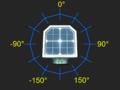 Geometry of values measured by daylight sensor in horizontal (yaw) mode
 -
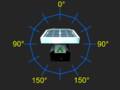 Geometry of values measured by daylight sensor in vertical (pitch) mode
 -
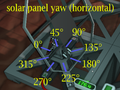 Effect of setting horizontal rotation of a solar panel


Solar tracking using Logic Chips
Two-chip Vertical tracking (Moon only)
.png)
Because the sun passes directly East to West with zero solar offset on the moon, it can be tracked using only 2 logic chips.
What do you need:
Place the Solar panel with the data port facing sunrise. Place the Daylight Sensor vertically on the wall with the data port facing down and the sensor facing sunrise. Build a Logic reader and a Batch Writer from the 2 Logic I/O Kits. Set the Logic Reader to read the Vertical Angle from the Daylight Sensor. Set the Batch Writer to Read the Reader and output the Vertical Angle to the Solar Panel (Dual). Manually rotate the Solar Panel to 270°. Add an Area Power Controller to make sure the Logic Chips do not lose power.
Two-chip Horizontal tracking

With the daylight sensor and solar panel correctly positioned, the solar panel can tack the sun's horizontal track using only 2 chips. On Mars this can yield approximately 80% efficient solar tracking if the solar panel is manually positioned at 45° vertical. Two-chip Horizontal and two-chip Vertical tracking cannot be combined.
What do you need:
Place the Solar panel with the data port facing sunrise. Place the Daylight Sensor horizontally with the data port facing North and the sensor facing up. Build a Logic reader and a Batch Writer from the 2 Logic I/O Kits. Set the Logic reader to read the Horizontal Angle from the Daylight Sensor. Set the Batch Writer to Read the Reader and output the Horizontal Angle to the Solar Panel (Dual). Manually lower the Solar Panel to 45°. Add an Area Power Controller to make sure the Logic Chips do not lose power.
Four Chip Vertical tracking

Vertical tracking requires two additional chips, a Logic Memory and a Math Unit. There are two different method of obtaining the correct vertical solar angle. Either (90-Solar angle) or (Solar angle+90).
What do you need:
- Solar Panel (Dual)
- Kit (Logic I/O) x2
- Kit (Logic Processor)
- Kit (Logic Memory)
- Kit (Sensor) > Daylight Sensor
- Cable
- Area Power Controller X1
Place the Solar panel with the data port facing sunrise. Place the Daylight Sensor horizontally with the data port facing North and the sensor facing up. Build a Logic Reader and a Batch Writer from the 2 Logic I/O Kits. Build a Math Unit from the Logic Processor kit and place the Logic Memory. Set the Logic Reader to read the Vertical Angle from the Daylight Sensor. Set the Logic Memory to 90. Set the left input of the Math Unit to read the Logic Memory. Set the right input of the Math Unit to read the Logic Reader. Set the bottom output of the Math Unit to subtract. Set the Batch Writer to read the Math unit and output the Vertical Angle to the Solar Panel (Dual). Rotate the Solar Panel to 270°. Add an Area Power Controller to make sure the Logic Chips do not lose power.
Combined Solar Tracking

Two-Chip Horizontal Tracking can be built independently and later upgraded by combining it with Four-Chip Vertical Tracking. In this way a simple yet functional solar power system can be constructed in the early game. Later the system can be upgraded to become more efficient. This is useful for Brutal Starts as it costs fewer resources and takes less time to get a functioning solar power setup.
What do you need:
- Build the Two-Chip Horizontal Tracking as shown above.
- Build the Four-Chip Vertical Tracking as shown above.
- The daylight sensor and area power controller can be shared between the two setups.
- Labelling the Logic Chips and Daylight Sensor will simplify setup
- If a labeler is unavailable the two logic networks can be built and configured separately so there is no overlap in component names.
Six-chip dual-axis tracking
To get a "100%" accurate solar tracker on planets with an offset solar arc, you need to include the Horizontal component to the solar angle.
What do you need:
Place the Daylight Sensor facing up, with the Data Port facing north (0 degrees).
| Horizontal | ||||
|---|---|---|---|---|
| Chip | Chip label | IN | VAR | OUT |
| Logic Reader | Horizontal Reader | Daylight Sensor | Horizontal | |
| Batch Writer | Horizontal Writer | Horizontal Reader | Horizontal | Solar Panel |
| Vertical | ||||
| Chip | Chip label | IN | VAR | OUT |
| Logic Reader | Vertical Reader | Daylight Sensor | Vertical | |
| Batch Writer | Vertical Writer | Vertical Correction Math | Vertical | Solar Panel |
| Chip | Chip label | Value | ||
| Logic Memory | Vertical Correction Memory | 90 | ||
| Chip | Chip label | IN 1 | IN 2 | OUT |
| Logic Math | Vertical Correction Math | Vertical Reader | Vertical Correction Memory | Add |

The panels should align themselves to the sun, you make sure to put the Power Port on the panels facing east (east - 90 degrees). If you've already built the panels and logic with the Power Port facing west, swapping the direction of the sensor so that its Data Port faces south will allow the setup to work with no additional changes.
Solar tracking using Integrated Circuits
Using Intergrated Logic Chips to track the sun will result in a much smaller logic set up, but the implementation might be a bit daunting at first. Conceptually the logic involved is the same.
- The orientation of the Solar Panel and Daylight Senor are the same.
- The Horizontal angle will need to be read from the Daylight Sensor
- The Vertical angle will need to be read for the Daylight Sensor
- The Vertical angle will need to be corrected.
- The following correction must be applied. (Vertical Angel + 90 = Vertical Angle{corrected}
- The Horizontal Angle will need to be sent to the Solar Panel
- The Vertical Angle will need to be sent to the Solar Panel
- Begin the process again
What you need:
And if you don't already have one set up:
Place the Daylight Sensor facing up, note which direction the Data Port is facing, and which direction the solar panel Power Port is facing. These two directions are needed in the code. The Daylight Sensor is connected to the d0 screw, that's all you need.
A simple code example can be found here: https://stationeering.com/tools/ic/_2FpmwojGnBq
This code is considered "inefficient" since it's hard-coded to spam all types of solar panels, even if you don't have them.
A better code example can be found here: https://stationeering.com/tools/ic/_2FpoBEcd3QK
It targets the solar-panel types on d2 and (optionally) d3, so it's less spammy. It also has an option for a display (Kit (Console)) on d1 that shows the sum of power output from both types of panels
duality of orientation
Due to the coordinate system used by solar panels, it is actually possible to capture peak sunlight using two different (but related) H,V coordinates.

This screenshot shows two sets of solar panels, each with its own daylight sensor. Each sensor is oriented differently to properly match its panel and formulas. The panel on the right uses panel.horizontal = daysensor.horizontal; panel.vertical = 90-daysensor.vertical; while the panel on the left uses panel.horizontal = daysensor.horizontal; panel.vertical = daysensor.vertical + 90. They both achieve the same orientation.