
Solar Logic Circuits Guide: Difference between revisions
More actions
Created non-moon section |
|||
| Line 37: | Line 37: | ||
| [[Logic I/O|Batch Writer]] || IN || [[Logic I/O|Logic Reader]] || OUT VAR || Vertical || OUT TYPE || [[Solar Panel]] | | [[Logic I/O|Batch Writer]] || IN || [[Logic I/O|Logic Reader]] || OUT VAR || Vertical || OUT TYPE || [[Solar Panel]] | ||
|} | |} | ||
==Solar tracking using Logic Chips - Non-Moon == | |||
Revision as of 19:56, 25 September 2025
<languages />
Disclaimer
Due to the frequency of game updates, all solutions are subject to change and may or may not be functional.
The designs on this page are valid as of v0.2.5906.26015 (2025-09-25)
Geometry Of Solar Panels and Daylight Sensors
-
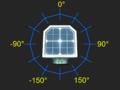 Geometry of values measured by daylight sensor in horizontal (yaw) mode
 -
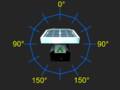 Geometry of values measured by daylight sensor in vertical (pitch) mode
 -
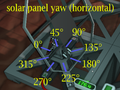 Effect of setting horizontal rotation of a solar panel
 -
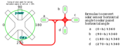 Equations relating horizontal sensor measurements from various orientations to solar panel horizontal rotation


Solar tracking using Logic Chips - Moon
Solar tracking on the Moon is very minimal and straightforward due to its having a 0° solar angle. You will need the following:
- x1 Daylight Sensor
- x1 Logic Reader
- x1 Batch Writer
- Cable Coils, a Wrench, a Screwdriver, and Wire Cutters at a minimum
The orientation of the Daylight Sensor is important for any solar logic control circuit. Since we are only controlling the vertical alignment (0° solar angle negates the need for horizontal control), the direction of the data port does not matter; however, the blue solar face of the Daylight Sensor must face either east or west. You will have to manually adjust the angle of the horizontal angle on the Solar Panel with a Wrench, dependent on the orientation you build the Solar Panel, and whether the Daylight Sensor faces east or west. Simply wait for the sun to be up and adjust until the panel is ~98% efficient.
Hook up the logical components as follows:
| Component | Port A | Connection A | Port B | Connection B | Port C | Connection C |
|---|---|---|---|---|---|---|
| Logic Reader | IN | Daylight Sensor | VAR | Vertical | N/A | N/A |
| Batch Writer | IN | Logic Reader | OUT VAR | Vertical | OUT TYPE | Solar Panel |