
Cables: Difference between revisions
From Stationeers Community Wiki
More actions
No edit summary |
Added Cable Coil (Super Heavy) details and images |
||
| (30 intermediate revisions by 22 users not shown) | |||
| Line 1: | Line 1: | ||
[[Category:Power]][[Category:Electronic]] | |||
{{Itembox | |||
| name = Cable Coil | |||
| image = [[File:ItemCableCoil.png]] | |||
| prefabhash = -466050668 | |||
| prefabname = ItemCableCoil | |||
| stacks = 50 | |||
| slot_class = SlotClass.Tool | |||
| sorting_class = SortingClass.Resources | |||
| recipe_machine1 = Autolathe | |||
| recipe_cost1 = 0.5g [[Copper]] | |||
| recipe_machine2 = Electronics Printer | |||
| recipe_cost2 = 0.5g [[Copper]] | |||
| constructs = 8 variants | |||
}} | |||
{{Itembox | |||
| name = Cable Coil (Heavy) | |||
| image = [[File:ItemCableCoilHeavy.png]] | |||
| prefabhash = 2060134443 | |||
| prefabname = ItemCableCoilHeavy | |||
| stacks = 50 | |||
| slot_class = SlotClass.Tool | |||
| sorting_class = SortingClass.Resources | |||
| recipe_machine1 = Electronics Printer | |||
| recipe_cost1 = 0.5g [[Gold]], 0.5g [[Copper]] | |||
| constructs = 8 variants | |||
}} | |||
{{Itembox | {{Itembox | ||
| name = Cable Coil (Super Heavy) | |||
| image = [[File:Cable Coil (Super Heavy).png]] | |||
| prefabhash = -551331063 | |||
| prefabname = ItemCableCoilSuperHeavy | |||
| stacks = 50 | |||
| slot_class = SlotClass.Tool | |||
| sorting_class = SortingClass.Resources | |||
| recipe_machine1 = Electronics Printer (Tier Two) | |||
| recipe_cost1 = 0.5g [[Electrum]], 0.5g [[Constantan]] | |||
| constructs = 8 variants | |||
}} | }} | ||
{{Structurebox | {{Structurebox | ||
| name = Cable | | name = Cable | ||
| image = | | image = [[File:Cable_straight.jpg]] | ||
| | | other = Handles up to 5kW of power | ||
| | | placed_with_item = [[Cable Coil]] | ||
| placed_on_grid = Small Grid | |||
| decon_with_tool1 = [[Wire Cutters]] | |||
| item_rec1 = [[Cable Coil]] | |||
}} | }} | ||
{{ | {{Structurebox | ||
| name | | name = Heavy Cable | ||
| image | | image = [[Image:Straight heavy.png]] | ||
| | | other = Handles up to 100kW of power | ||
| | | placed_with_item = [[Cable Coil (Heavy)]] | ||
| | | placed_on_grid = Small Grid | ||
| | | decon_with_tool1 = [[Wire Cutters]] | ||
| item_rec1 = [[Cable Coil (Heavy)]] | |||
}} | }} | ||
{{Structurebox | {{Structurebox | ||
| name = Heavy Cable | | name = Super-Heavy Cable | ||
| | | image = [[File:Super-Heavy Cable (Straight).png]] | ||
| other = Handles up to | | other = Handles up to 500kW of power | ||
| placed_with_item = [[Cable Coil (Super Heavy)]] | |||
| placed_on_grid = Small Grid | |||
| decon_with_tool1 = [[Wire Cutters]] | |||
| item_rec1 = [[Cable Coil (Super Heavy)]] | |||
}} | }} | ||
== Description == | == Description == | ||
[[Cables]] connect power and data to various machines and electronics. Different cable types | [[Cables]] connect power and data to various machines and electronics. Different cable types are rated for different maximum loads before they will experience burnout. | ||
* Cable Coil: 5 kW | |||
* Cable Coil (Heavy): 100 kW | |||
* Cable Coil (Super Heavy): 500 kW | |||
[[Transformer|Transformers]] and [[Kit_(Cable_Fuses)|fuses]] can help to protect against overload damage. | |||
== Cable Networks == | == Cable Networks == | ||
Interconnected cables create networks. Devices connected to a network can draw [[Power]] or connect with [[Data]], as long as the device is connected with the respective power or data port. | Interconnected cables create networks. Devices connected to a network can draw [[Power]] or connect with [[Data]], as long as the device is connected with the respective power or [[Data Port|data port]]. | ||
==Variations== | ==Variations== | ||
Can be painted individually or by the stack with [[Spray Can]]. (consumes a single 'use' of the can either way, far more efficient to paint a full stack) | |||
Cable Coil: | |||
<gallery mode='traditional'> | <gallery mode='traditional'> | ||
Image:Cable_straight.jpg|Straight | Image:Cable_straight.jpg|Straight | ||
Image:Cable_corner.jpg| Corner | Image:Cable_corner.jpg| Corner | ||
Image:Cable_junction.jpg| Junction | Image:Cable_junction.jpg| Junction | ||
Image:Cable_four_way.jpg| 4-Way Junction | Image:Cable_four_way.jpg| 4-Way Junction | ||
Image:5-way junction.png|thumb|5-Way Junction | |||
Image:Cable_six_way.jpg| 6-Way Junction | Image:Cable_six_way.jpg| 6-Way Junction | ||
Image:Cable_corner_three.jpg| 3-Way Corner | |||
File:4-way junction.png|4-Way Corner | |||
</gallery> | |||
Cable Coil (Heavy): | |||
<gallery mode='traditional'> | |||
Image:Straight heavy.png|thumb|Straight | |||
Image:Corner heavy.png|thumb|Corner | |||
Image:3-way junction heavy.png|thumb|Junction | |||
Image:4-way junction heavy.png|thumb|4-Way Junction | |||
Image:5-way junction heavy.png|thumb|5-Way Junction | |||
Image:6-way junction heavy.png|thumb|6-Way Junction | |||
Image:3-way corner heavy.png|3-Way Corner | |||
Image:4-way corner heavy.png|thumb|4-Way Corner | |||
</gallery> | |||
Cable Coil (Super Heavy): | |||
<gallery> | |||
File:Super-Heavy Cable (Straight).png|Straight | |||
File:Super-Heavy Cable (Corner).png|Corner | |||
File:Super-Heavy Cable (Junction).png|3-way Junction | |||
File:Super-Heavy Cable (Junction 4).png|4-way Junction | |||
File:Super-Heavy Cable (Junction 5).png|5-way Junction | |||
File:Super-Heavy Cable (Junction 6).png|6-way Junction | |||
File:Super-Heavy Cable (Corner 3).png|3-way Corner | |||
File:Super-Heavy Cable (Corner 4).png|4-way Corner | |||
</gallery> | </gallery> | ||
Latest revision as of 00:05, 18 April 2026
 | |
| Constructing Options | 8 variants |
|---|---|
| Properties | |
| Stacks | Yes (50) |
| Recipes | |
| Autolathe | 0.5g Copper |
| Electronics Printer | 0.5g Copper |
| Logic | |
| Item Hash | -466050668 |
| Item Name | ItemCableCoil |
| Logic Classes |
SlotClass.Tool SortingClass.Resources |
 | |
| Constructing Options | 8 variants |
|---|---|
| Properties | |
| Stacks | Yes (50) |
| Recipes | |
| Electronics Printer | 0.5g Gold, 0.5g Copper |
| Logic | |
| Item Hash | 2060134443 |
| Item Name | ItemCableCoilHeavy |
| Logic Classes |
SlotClass.Tool SortingClass.Resources |
.png) | |
| Constructing Options | 8 variants |
|---|---|
| Properties | |
| Stacks | Yes (50) |
| Recipes | |
| Electronics Printer (Tier Two) | 0.5g Electrum, 0.5g Constantan |
| Logic | |
| Item Hash | -551331063 |
| Item Name | ItemCableCoilSuperHeavy |
| Logic Classes |
SlotClass.Tool SortingClass.Resources |
 | |
| Handles up to 5kW of power | |
| Operation | |
|---|---|
| Construction | |
| Placed with | Cable Coil |
| Placed on | Small Grid |
| Stage 1 | |
| Deconstruction | |
| Deconstructed with | Wire Cutters |
| Item received | Cable Coil |
 | |
| Handles up to 100kW of power | |
| Operation | |
|---|---|
| Construction | |
| Placed with | Cable Coil (Heavy) |
| Placed on | Small Grid |
| Stage 1 | |
| Deconstruction | |
| Deconstructed with | Wire Cutters |
| Item received | Cable Coil (Heavy) |
.png) | |
| Handles up to 500kW of power | |
| Operation | |
|---|---|
| Construction | |
| Placed with | Cable Coil (Super Heavy) |
| Placed on | Small Grid |
| Stage 1 | |
| Deconstruction | |
| Deconstructed with | Wire Cutters |
| Item received | Cable Coil (Super Heavy) |
Description
Cables connect power and data to various machines and electronics. Different cable types are rated for different maximum loads before they will experience burnout.
- Cable Coil: 5 kW
- Cable Coil (Heavy): 100 kW
- Cable Coil (Super Heavy): 500 kW
Transformers and fuses can help to protect against overload damage.
Cable Networks
Interconnected cables create networks. Devices connected to a network can draw Power or connect with Data, as long as the device is connected with the respective power or data port.
Variations
Can be painted individually or by the stack with Spray Can. (consumes a single 'use' of the can either way, far more efficient to paint a full stack)
Cable Coil:
-
 Straight
 -
 Corner
 -
 Junction
 -
 4-Way Junction
 -
 5-Way Junction
 -
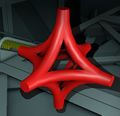 6-Way Junction
 -
 3-Way Corner
 -
 4-Way Corner


Cable Coil (Heavy):
-
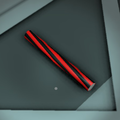 Straight
 -
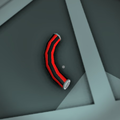 Corner
 -
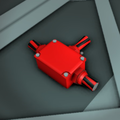 Junction
 -
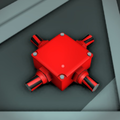 4-Way Junction
 -
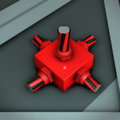 5-Way Junction
 -
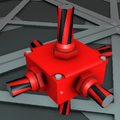 6-Way Junction
 -
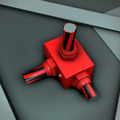 3-Way Corner
 -
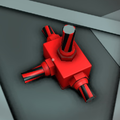 4-Way Corner


Cable Coil (Super Heavy):
-
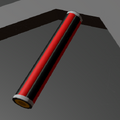 Straight
 -
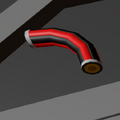 Corner
 -
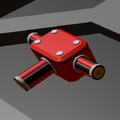 3-way Junction
 -
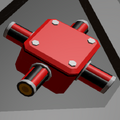 4-way Junction
 -
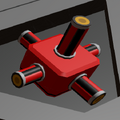 5-way Junction
 -
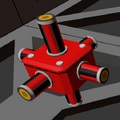 6-way Junction
 -
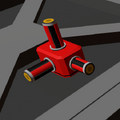 3-way Corner
 -
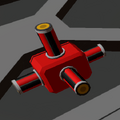 4-way Corner
.png)
.png)
.png)
.png)
.png)
.png)
.png)